
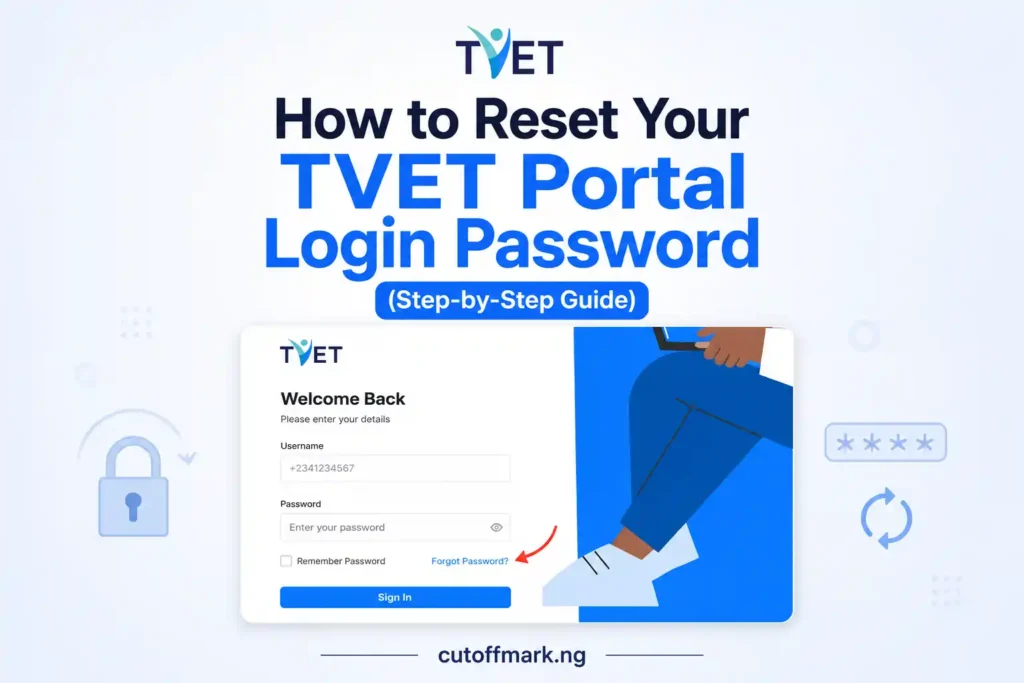
Forgot your TVET portal login password? You reset it using your registered phone number and NIN, or your registered email address if you no longer remember your NIN.
Highlights
- To change or reset your FME TVET password, if you still know your NIN, go to TVET login page and click Forgot Password, enter your registered phone number, verify your identity with your NIN, create a new password, and log in using your phone number and new password.
- If you cannot remember your NIN, repeat the same process but choose Skip, send OTP, retrieve the verification code sent to your registered email address, enter the code, create a new password, and sign in with your new credentials.
- You do not need to create a new TVET account just because you forgot your password.
- This guide explains both password recovery methods, common login problems, and practical solutions that have worked for applicants.
For many Nigerians, the Federal Government TVET Programme has become an important opportunity to gain practical skills, earn industry-recognized certifications, and improve employment prospects. Since registration opened months ago, many applicants are only now returning to their accounts to continue their application or check updates, only to discover they can no longer remember their password.
Although this guide is not directly about university admission, it reflects CutOffMark.ng’s mission of helping Nigerian students and young people access genuine opportunities. Besides admission updates, we also publish practical guides on Federal Government training programmes, student loans, scholarships, career opportunities, and other resources that can make a real difference. If a guide saves applicants from unnecessary frustration, then it belongs here.
The good news is that forgetting your TVET password does not mean your application is lost. The portal provides two official recovery methods. If you still remember your NIN, the process is straightforward. If you no longer remember your NIN, you can still recover your account using the email address you registered with, provided you can access that email inbox.
This guide explains both methods step by step.
Method 1: Reset Your TVET portal login password using your NIN
This is the fastest password recovery method if you still remember the NIN you used during registration.
Step 1: Open the TVET Login Page
Visit the official TVET portal login page via https://www.tvet.education.gov.ng/login/
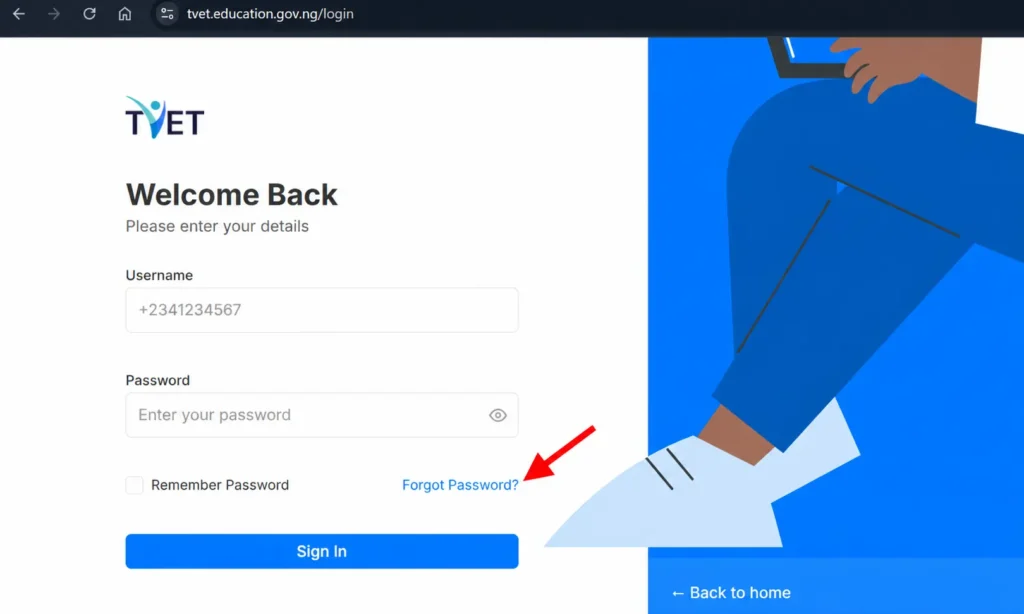
Instead of trying different passwords repeatedly, click Forgot Password below the login form. This opens the password recovery page.
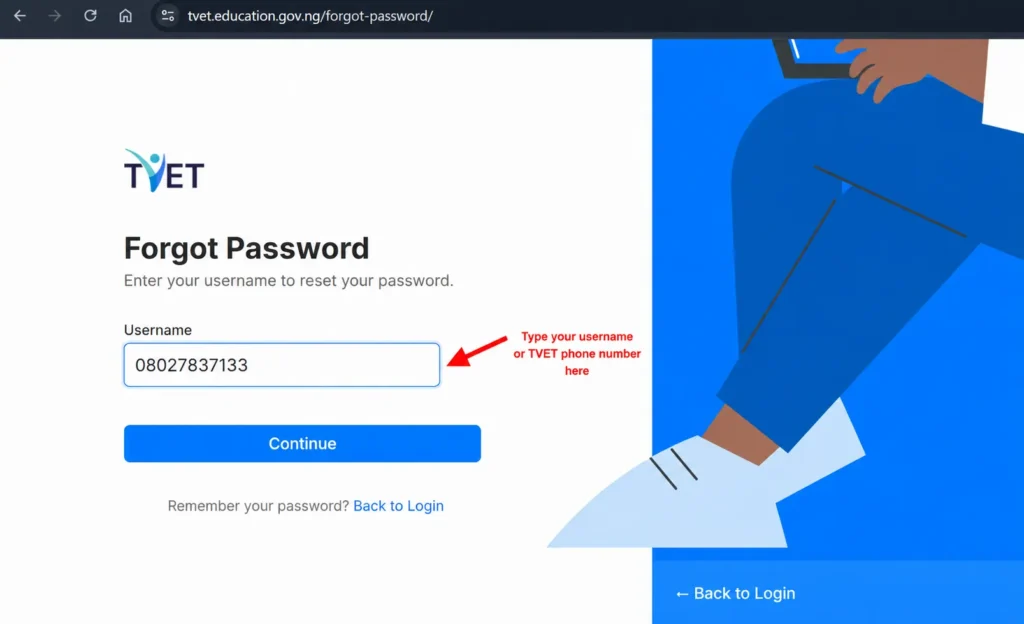
Step 2: Enter Your Registered Phone Number
On the next page, enter the phone number you used when creating your TVET account.
The system uses this phone number to locate your application.
Be careful not to enter:
- A new phone number
- A friend’s number
- Another SIM card you currently use
If you registered with a different phone number months ago, that is the number you should enter.
Step 3: Verify Your Identity Using Your NIN
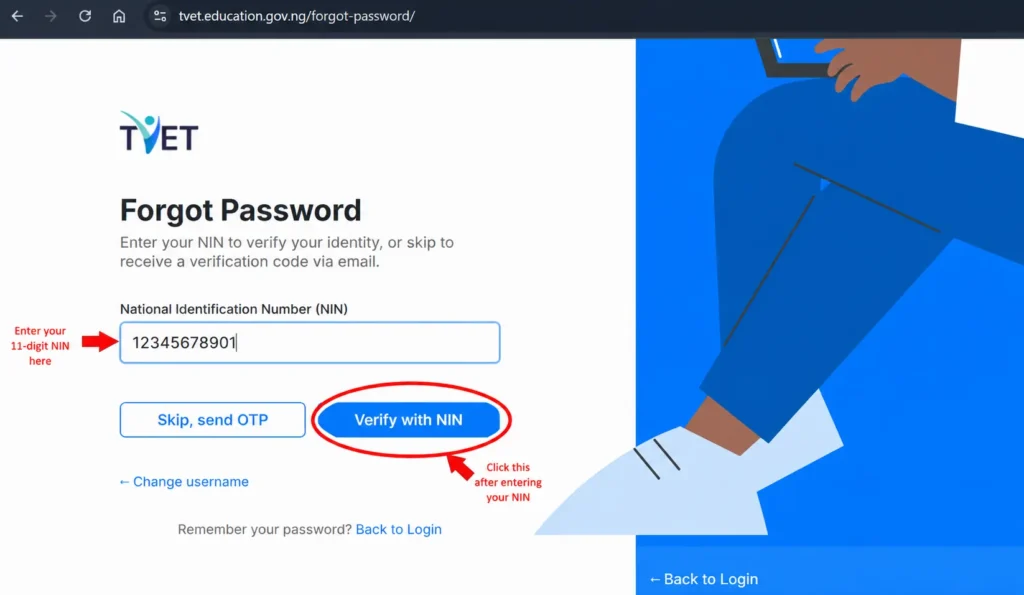
The next page asks for your National Identification Number (NIN).
Enter the same NIN you used during registration, then click Verify with NIN.
The system checks whether the NIN matches your registration details before allowing you to create a new password.
Double-check every digit before clicking Verify.
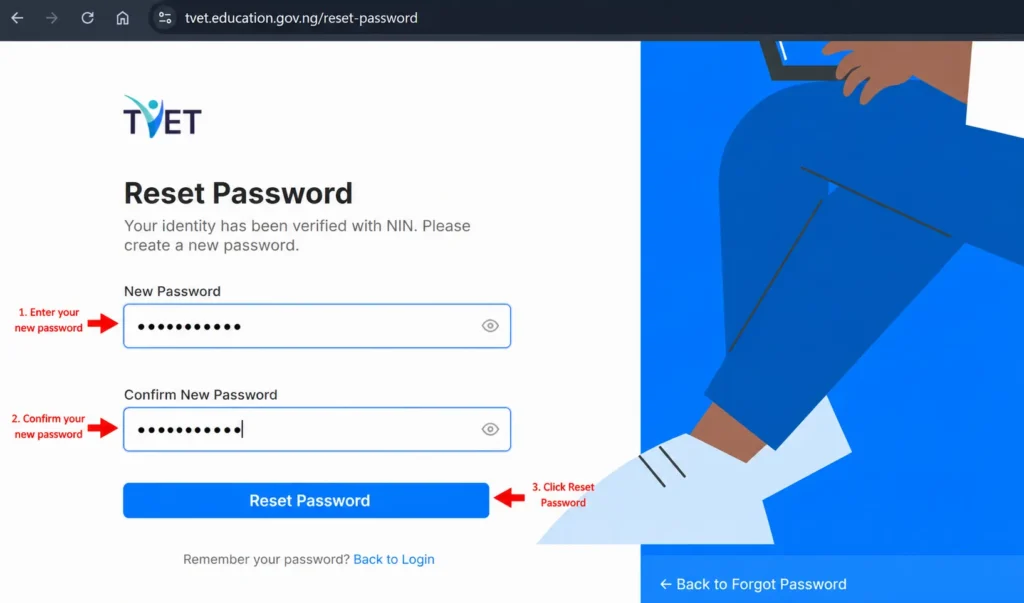
Step 4: Create a New Password
Once your identity has been verified, the portal will ask you to choose a new password.
Enter your new password, type the same password again in the confirmation box, then click Reset Password.
To reduce the risk of forgetting it again, create a password that is both secure and memorable.
Step 5: Log In with Your New Password
After resetting your password successfully, return to the login page.
Use:
- Your registered phone number
- Your newly created password
You should now have access to your TVET dashboard. After signing in successfully, continue your application from where you stopped. If this is your first time accessing the dashboard, our guide on logging into the FG TVET application portal explains what each section means and how to complete your registration correctly.
Method 2: Reset your TVET password using your email address
Many applicants worry that they cannot recover their account because they no longer remember their NIN.
Fortunately, the TVET portal provides another recovery option.
As long as you still have access to the email address you used during registration, you can reset your password without entering your NIN.
This method relies on a verification code sent to your email.
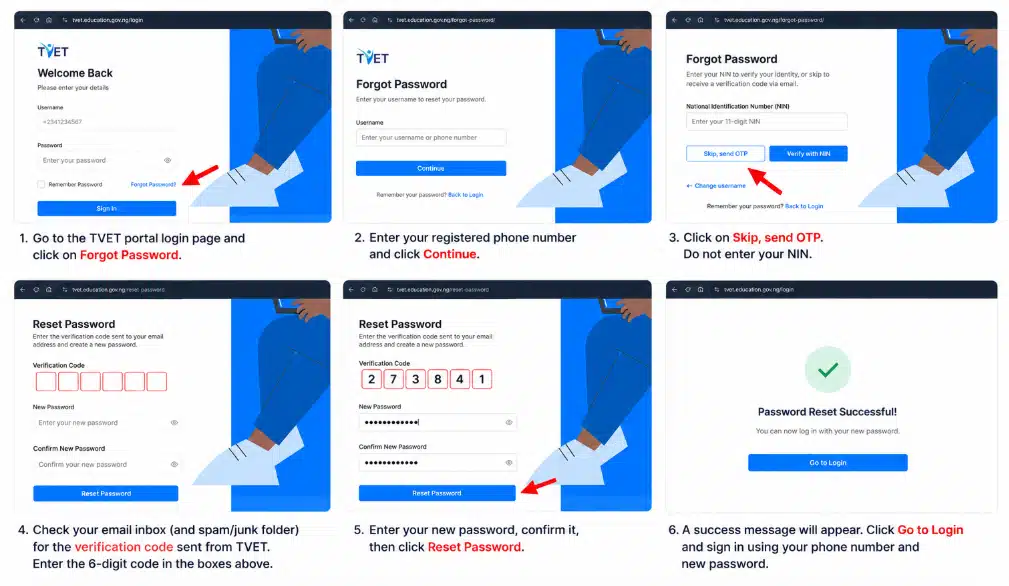
Step 1: Click Forgot Password
Start from the TVET login page via https://www.tvet.education.gov.ng/login/ and click Forgot Password, just as you would when using the NIN method.
Step 2: Enter Your Registered Phone Number
Enter the phone number linked to your TVET account.
Click Continue.
Do not use a different phone number simply because you have changed SIM cards.
The portal needs the number you originally registered with.
Step 3: Choose “Skip, Send OTP”
Instead of entering your NIN, click Skip, send OTP.
This tells the portal that you would like to verify your identity through your registered email address instead.
Step 4: Check Your Email
The portal will send a verification code (OTP) to the email address attached to your TVET account.
Open your inbox and look for the email.
The code should arrive your email under 1-2 mins. If you cannot find it immediately:
- Refresh your inbox.
- Check your Spam folder.
- Check your Promotions folder (Gmail).
- Wait a few minutes and check again.
Many applicants assume the portal is not working when the email is simply in another folder.
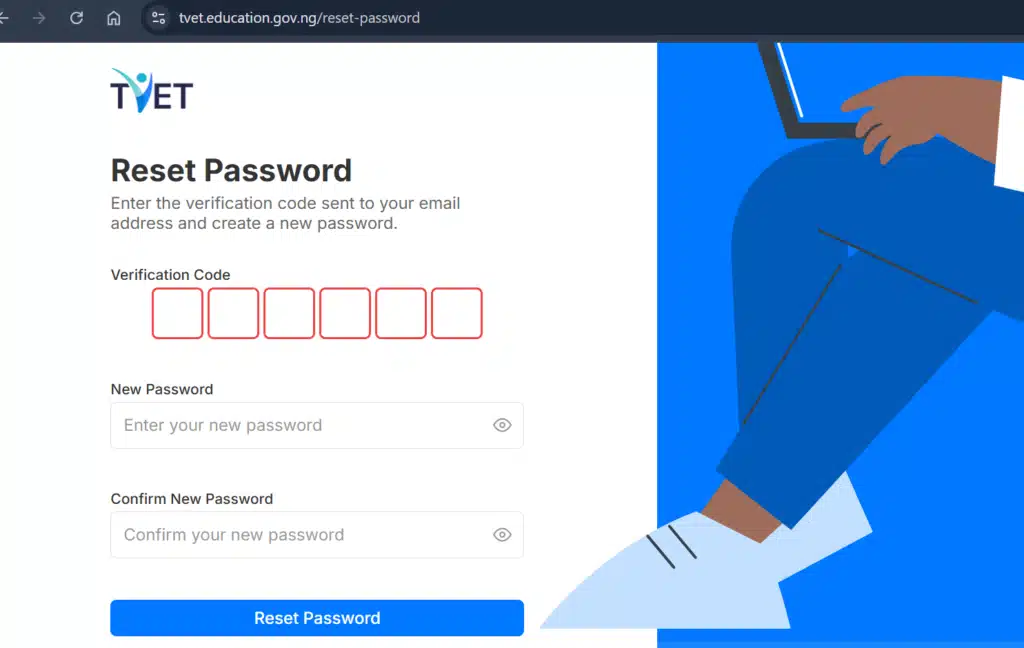
Step 5: Enter the Verification Code
Return to the TVET password reset page.
Type the verification code exactly as it appears in your email.
Verification codes usually expire after some time, so enter the code as soon as possible.
Step 6: Create a New Password
After your verification code is accepted, enter your new password.
Confirm the password.
Click Reset Password.
Your new password immediately replaces the old one.
Step 7: Sign In
Go back to the login page.
Sign in using:
- Your registered phone number
- Your new password
Your account should now open normally.
Which Password Recovery Method Should You Use?
If you still remember your NIN, verifying with NIN is generally the quicker option because you do not have to wait for a verification email.
However, if you no longer remember your NIN, using your registered email address is an excellent alternative, provided you can still access that email account.
Both methods are official and lead to the same result.
Common TVET Password Reset Problems and Solutions
The Portal Says My Phone Number Is Incorrect
This usually happens because the wrong phone number is entered.
Use the exact phone number submitted during registration.
If you changed SIM cards after registering, do not enter your new number.
I Don’t Remember My NIN
Choose Skip, send OTP instead.
As long as you can access your registered email address, you can still reset your password.
I Didn’t Receive the Verification Email
Before requesting another code, check:
- Spam folder
- Junk folder
- Promotions folder
- Social folder
Sometimes emails arrive after a few minutes.
If nothing appears after waiting, request another verification code.
The Verification Code Is Invalid
Verification codes expire.
If your code no longer works, return to the previous page and request a fresh code.
Always use the latest code sent to your email.
I Forgot My Registered Email Too
This is one of the most difficult situations because the portal can no longer verify your identity through email.
If you also cannot remember your NIN, you should contact the programme’s official support channels for assistance rather than creating another account.
I Reset My Password but Still Can’t Log In
First make sure you are entering:
- Your registered phone number
- Your newly created password
If the problem continues, clear your browser cache or try another browser before attempting another reset.
Tips to Avoid Forgetting Your Password Again
After successfully recovering your account, take a few minutes to prevent the same problem in the future.
Save your password in your browser’s password manager, store it in a trusted password manager app, or write it down somewhere only you can access. Also ensure that your registered email account remains active because it may be needed for future account recovery.
These small habits can save you a great deal of time if you ever need to reset your password again.
Editorial Note from CutOffMark.ng
We created this guide because we experienced the same problem ourselves. After returning to the TVET portal months after registration, we realized how easy it is to forget login details. Instead of creating another account, we followed the official recovery process and regained access successfully.
That is the kind of practical guidance we aim to publish on CutOffMark.ng. Our goal is not simply to report opportunities but to help students and young Nigerians overcome the real problems they face when applying for admissions, scholarships, Federal Government programmes, student loans, career opportunities, and skills development initiatives.
Frequently Asked Questions
Can I reset my TVET password without my NIN?
Yes. If you no longer remember your NIN, click Skip, send OTP and verify your identity using the email address linked to your TVET account.
Can I use another phone number?
No. You should use the same phone number you used during registration.
Do I need to create another TVET account?
No. If you already have an account, simply recover your password using one of the official methods.
Why didn’t I receive my OTP email?
Check your Spam, Junk, Promotions, or Social folders. If you still cannot find it, request another verification code.
Will resetting my password affect my application?
No. Resetting your password only restores access to your account. Your application remains intact.
Lastly
Forgetting your TVET portal password is a common problem, especially for applicants who registered months ago and are only now returning to the portal. Fortunately, the recovery process is simple. If you remember your NIN, you can verify your identity and create a new password within minutes. If you no longer remember your NIN, you can still regain access through your registered email address by requesting a verification code.
Whichever method you choose, remember to save your new password somewhere secure after regaining access. And if you’re looking for more practical guides on Federal Government programmes, scholarships, student loans, admissions, and career opportunities, keep checking CutOffMark.ng, where our focus is not just sharing opportunities, but helping you successfully access them.
Thank you sir I tried it and it work for me I really appreciate your guide